Join before launch. Get 30 days of Premium free.
Your time starts when you activate. See how it works ↓
Local recordkeepingYou choose the categoryExport for your own review
INSIDE THE CURRENT BUILD01 / YOUR OVERVIEW
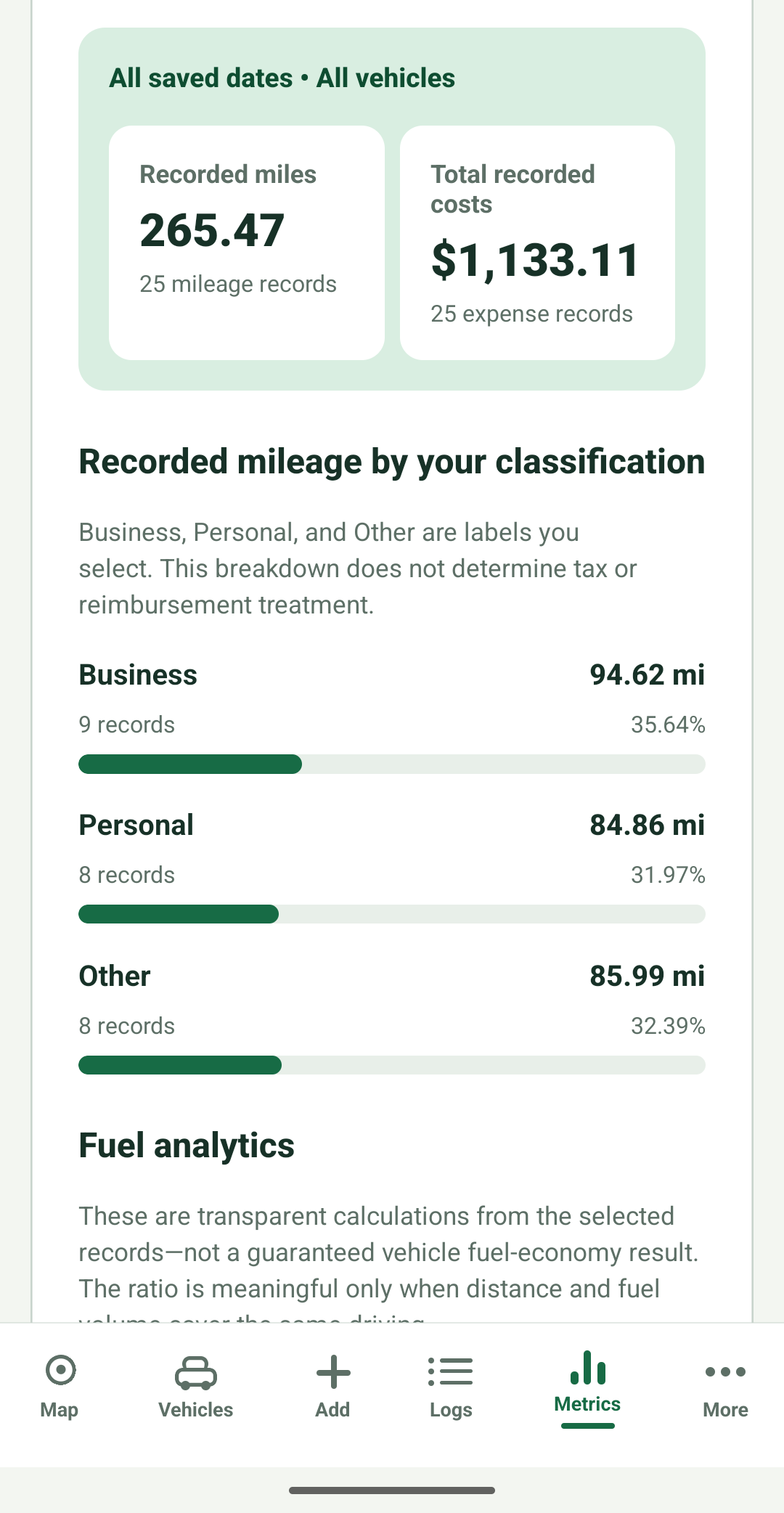
Your records, at a glance. Development screen · Sample data · Cropped preview
A LITTLE MORE ORDER. A LITTLE LESS BACKTRACKING.
Give your driving a place to live.
For independent workers, delivery and rideshare drivers, small-business owners, and
anyone keeping track of vehicle use. OdoPad brings the records together, while you
decide what they mean and how to use them.
01
Record
Enter mileage yourself or start a drive with a tap.
02
Review
Choose the category and add the context only you know.
03
Understand
See your recorded distance and vehicle costs, kept separate.
04
Take it with you
Export supporting records for your own review or sharing.
THE FOUNDATION IS ALREADY TAKING SHAPE
Inside OdoPad.
Six original app screens, cropped to focus on the features, and selected pages of an
app-generated PDF with updated OdoPad branding. All previews use sample data. Based on
the September 9 Android handoff with the PDF layout correction shown here. Tap any image
to see the full-resolution capture. iOS and physical-device validation are still in
progress.
02Current development build
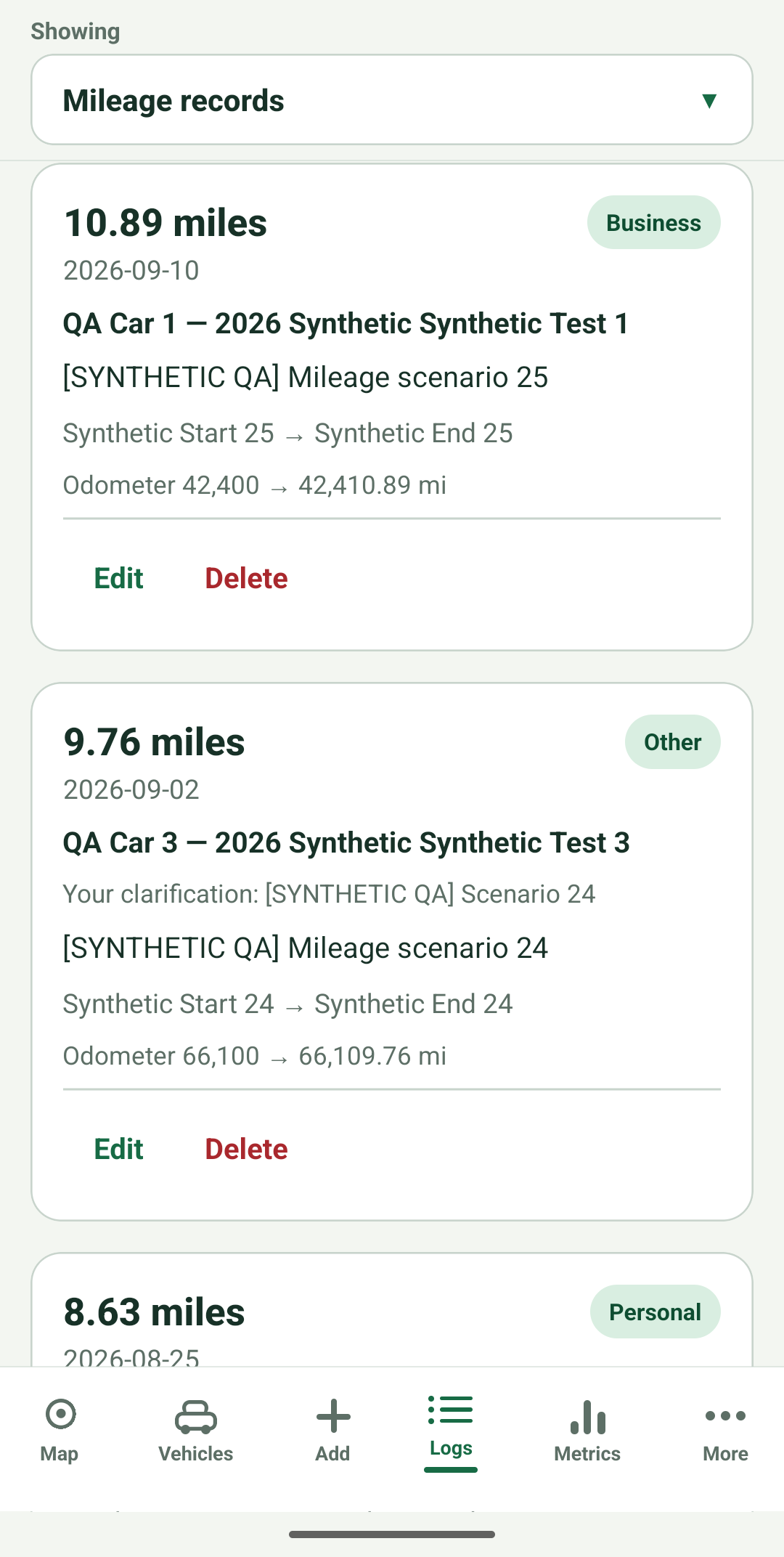
Mileage, with your context.
Keep each drive organized with mileage, a vehicle, and the category you choose. Add
your own purpose and edit the details as you go.
Original screen · Sample data · Cropped preview
Manual mileage works offline. Business, Personal, Other, and your own categories stay
your choice.
03Current development build
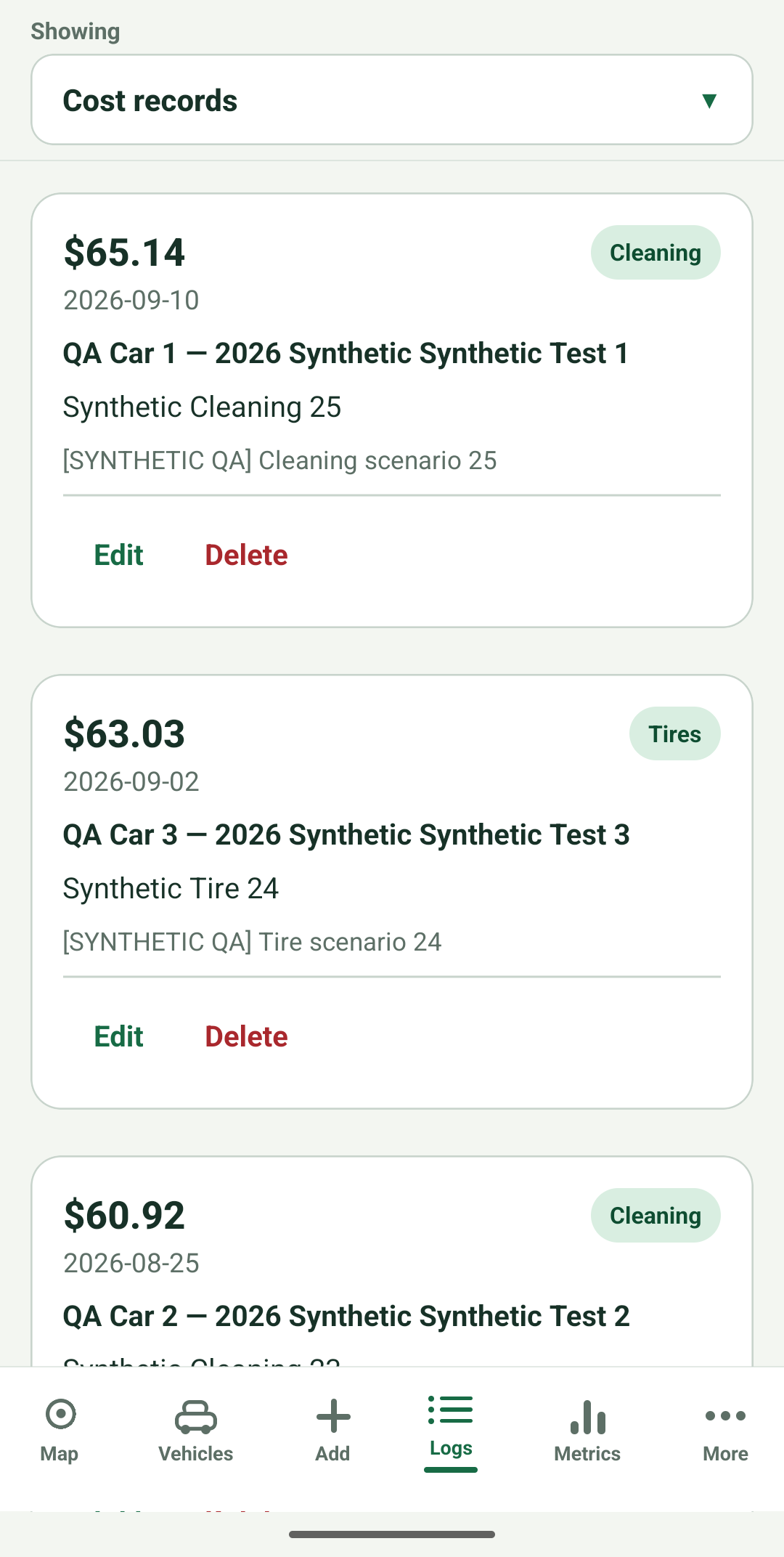
Know where your vehicle costs go.
Fuel, charging, parking, maintenance, and more: keep your recorded vehicle expenses
together, with amounts and details that are easy to review.
Original screen · Sample data · Cropped preview
Add a merchant, notes, and optional fuel or charging quantities. Calculations use the
amounts you enter.
04Current development build
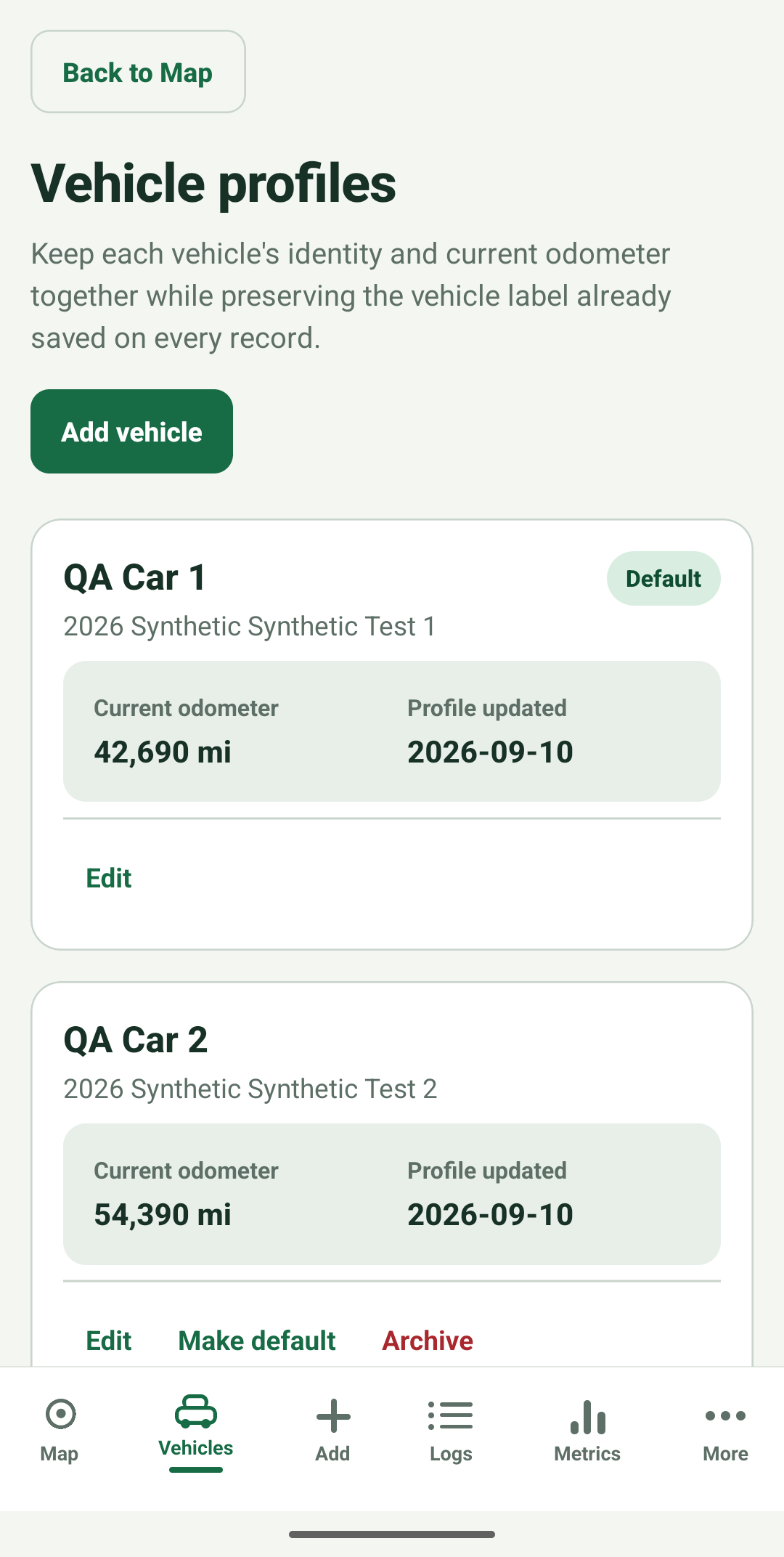
A clear view of each vehicle.
Give each vehicle its own profile, confirmed odometer, and associated records. Switch
between vehicles when you want a closer look.
Original screen · Sample data · Cropped preview
The current Free configuration supports two active vehicle slots for new work;
development Premium supports up to five.
05Current development build
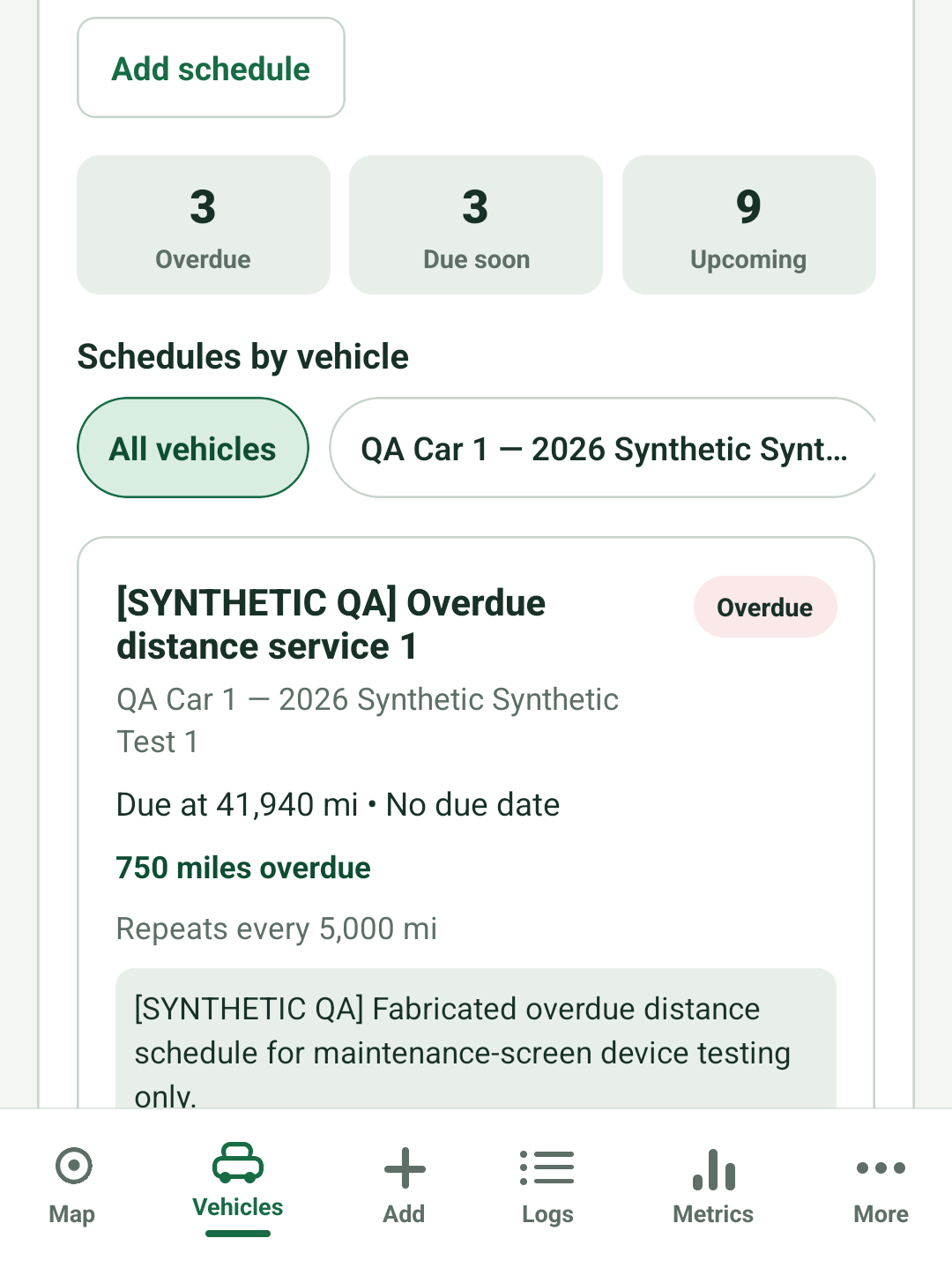
Keep your maintenance plans together.
Plan the next service around a date, an odometer reading, or both. Review upcoming
work and record a completed task in one place.
Original screen · Sample data · Cropped preview
A development Premium feature, based on schedules you enter. Maintenance status is
planning arithmetic, not a mechanical assessment.
06Current development build
Take your records with you.
Create a supporting PDF summary, or export mileage and expenses as CSV or JSON. Keep a
copy or share it with a bookkeeper or another professional.
Standard PDF creation is available across plans, up to 1,000 records and the
document-size limit. Development Premium adds custom date and vehicle selection.
07Current development build
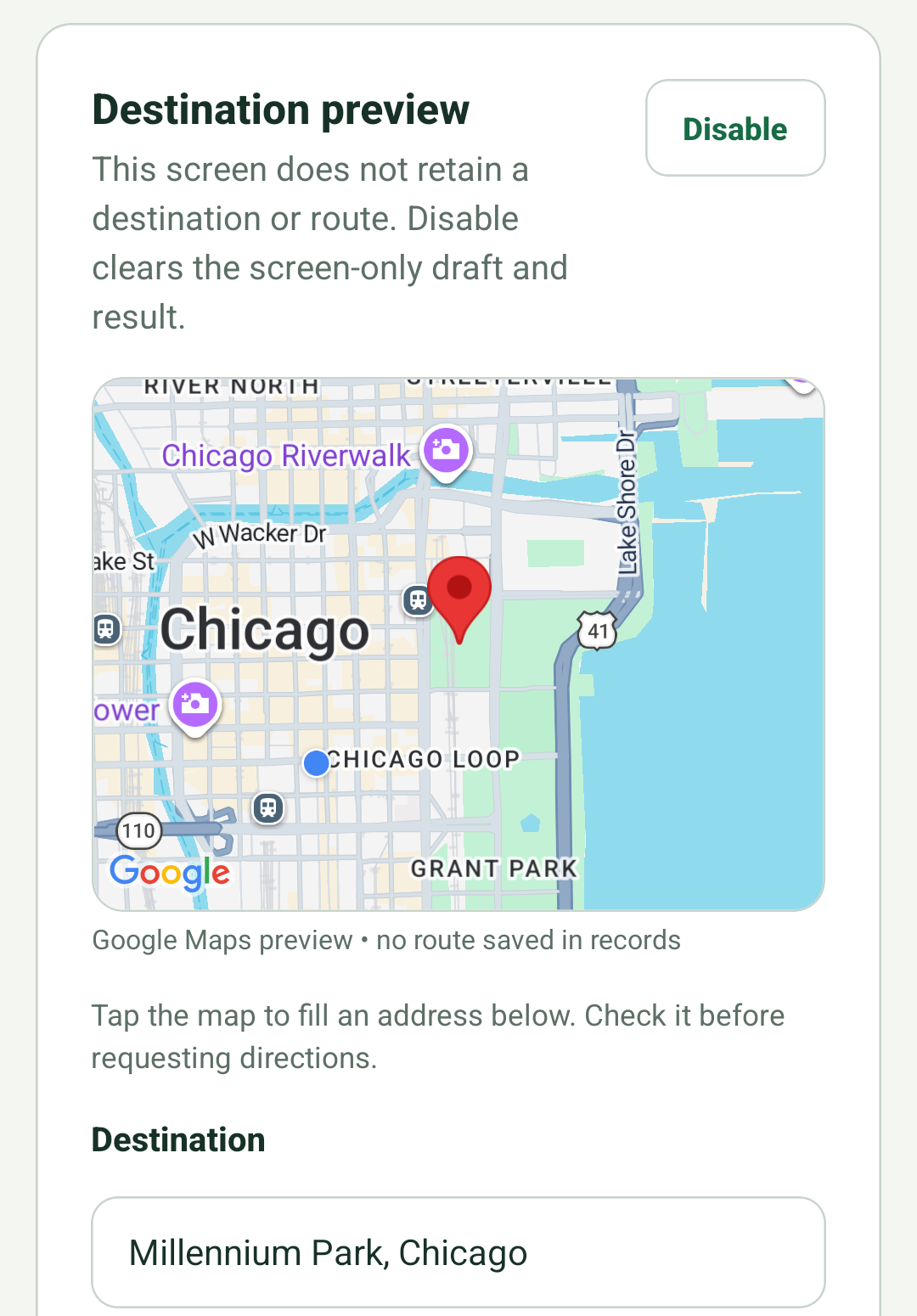
Find a place. Make it your next stop.
Enable the map for your session, show your location with permission, or tap to place a
destination pin. Choose an external map provider when you’re ready for directions.
Original screen · Sample data · Cropped preview
Google Maps on Android and Apple Maps on iOS provide the map. Lookup and location have
separate controls; destinations stay on this screen rather than in your saved ledger.
Recordkeeping support only — not tax advice. You decide how each record is classified and
used. OdoPad does not determine tax treatment or whether another person or organization
will accept your records.
FROM THE APP TO A FILE YOU CAN KEEP
A closer look at your export.
App-generated PDF · Updated branding · Sample data Choose a section below. Every
preview opens at full resolution.
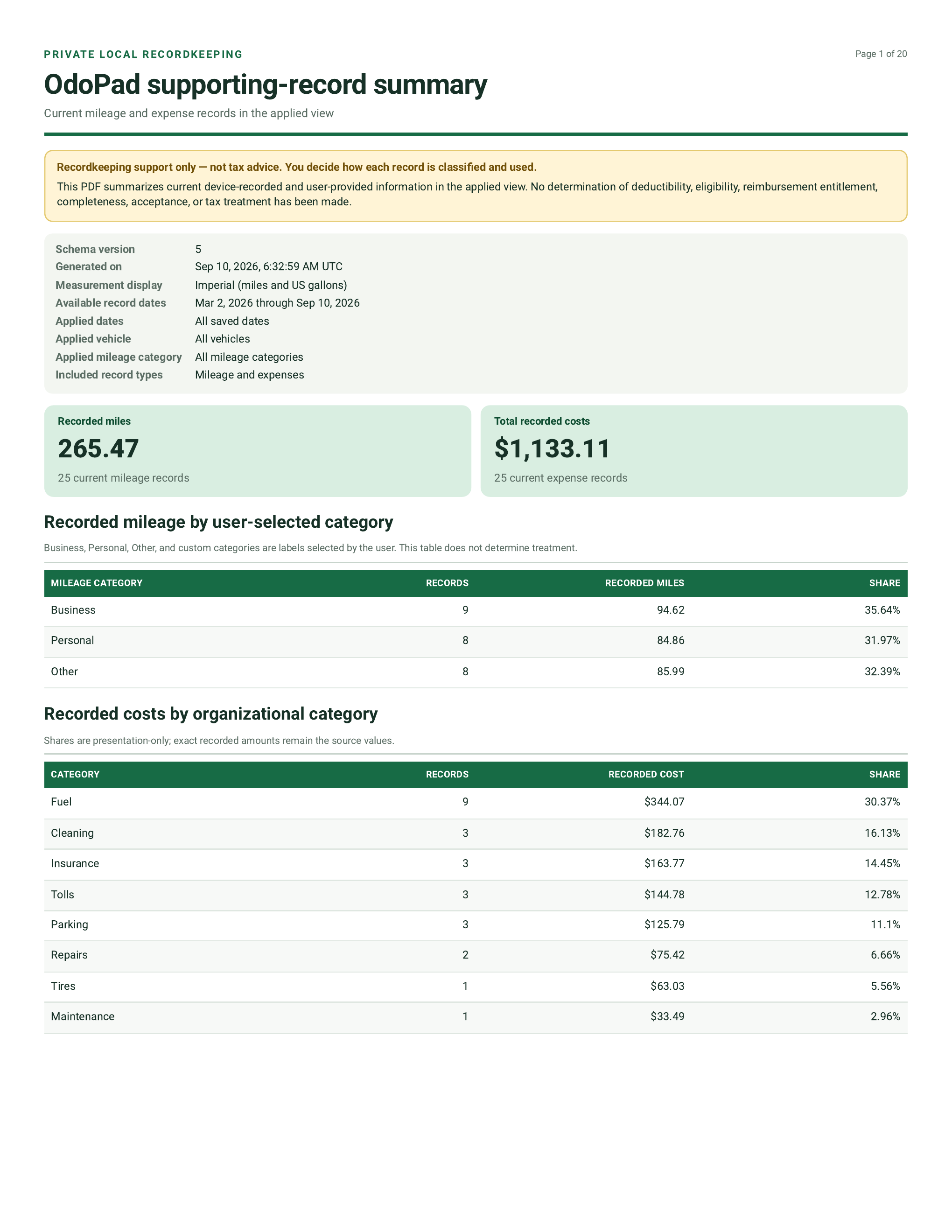
The sample summary includes Business, Personal, and Other mileage, alongside separate
totals for 25 mileage records and 25 expense records. The document identifies its
dates and applied view.
Detail from the actual sample PDF · Select to open the complete page
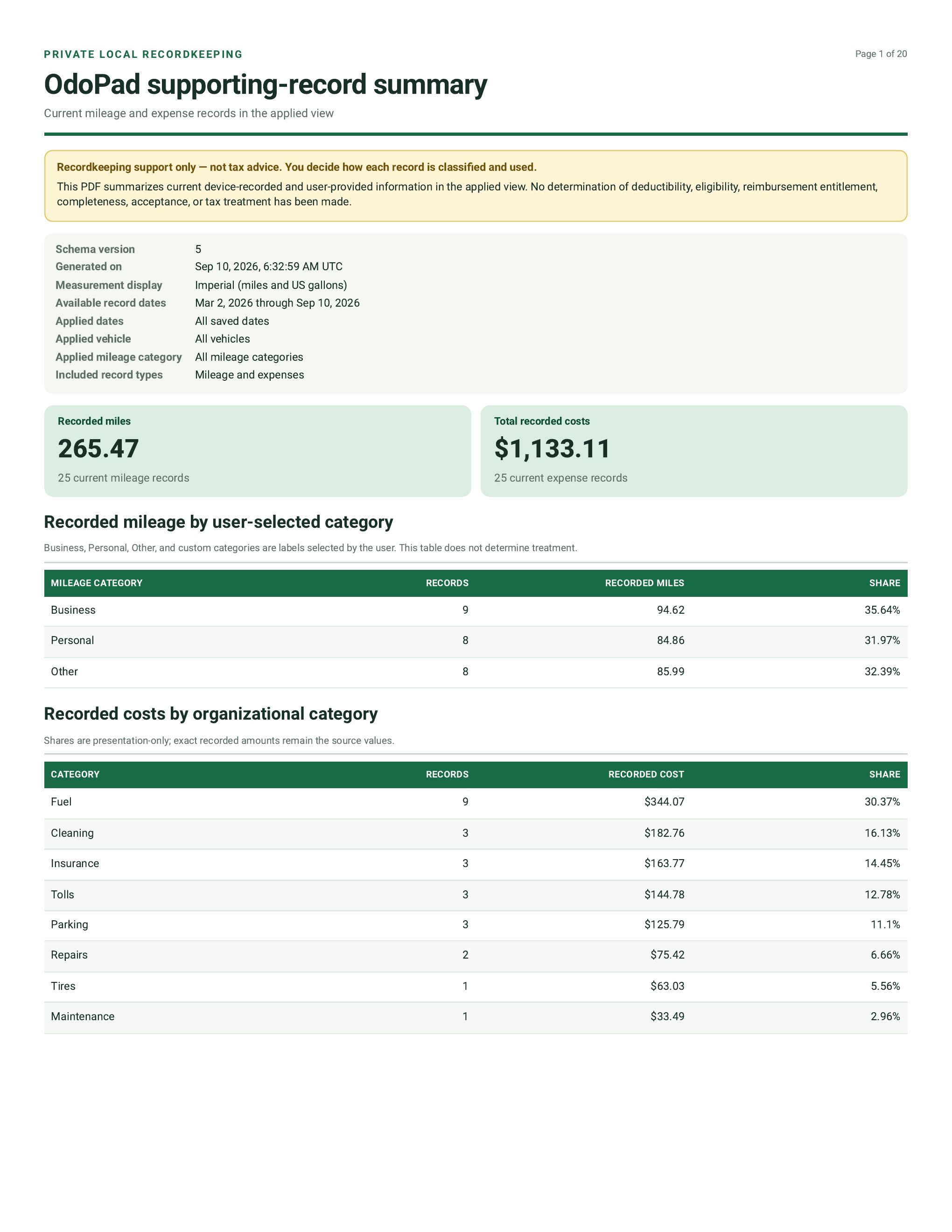
See how recorded costs are grouped.
Organizational categories show their record counts, exact amounts, and share of
recorded costs. These costs share the opening summary page with the mileage
categories.
Detail from the actual sample PDF · Select to open the complete page
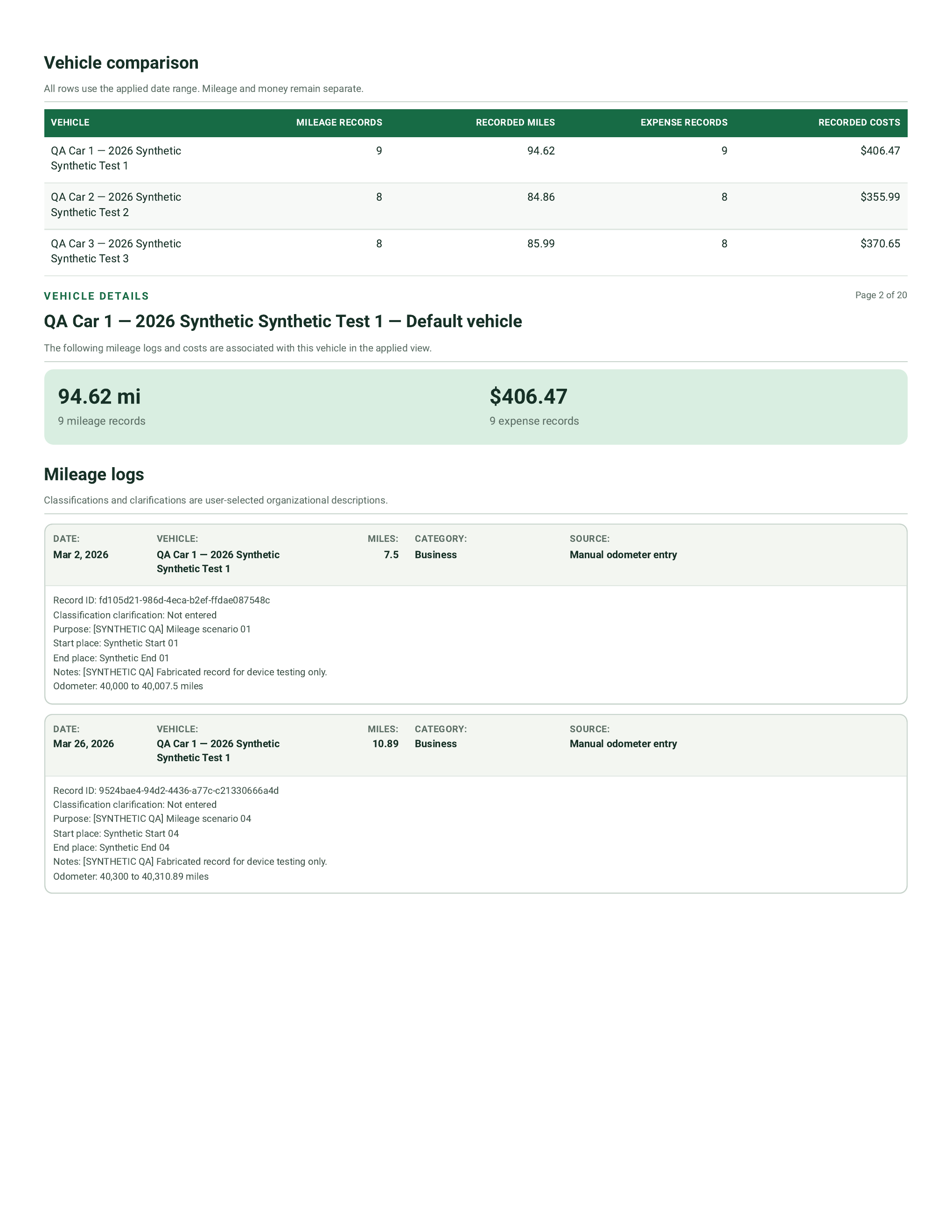
A separate view across vehicles.
Compare each vehicle’s recorded distance and costs without combining the two. The
sample includes three vehicles, and the detailed sections that follow are grouped by
vehicle.
Detail from the actual sample PDF · Select to open the complete page
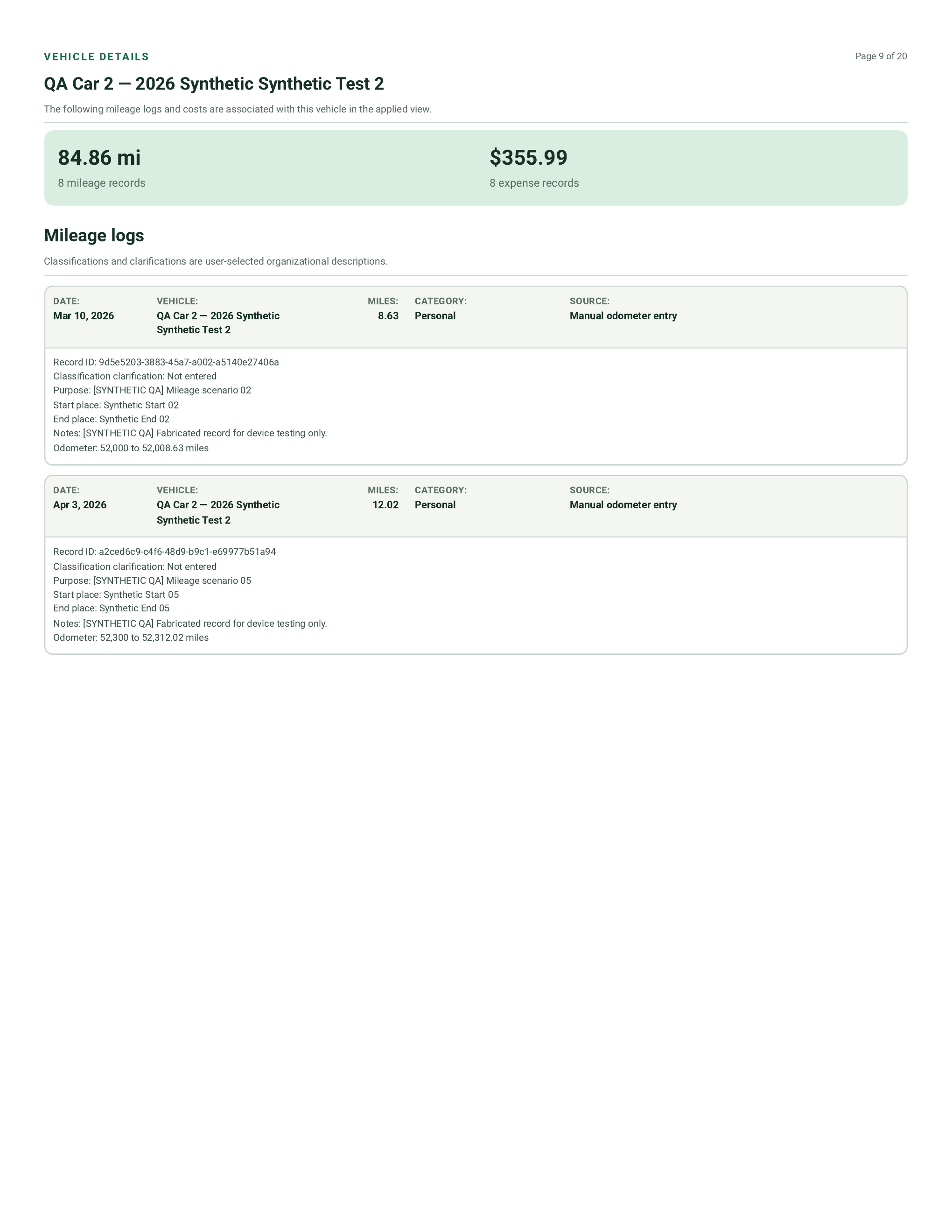
Keep the context behind each drive.
The vehicle sections contain the individual mileage logs, including category, date,
distance, purpose, places, notes, and source. This page shows Personal mileage from
the sample ledger.
Detail from the actual sample PDF · Select to open the complete page
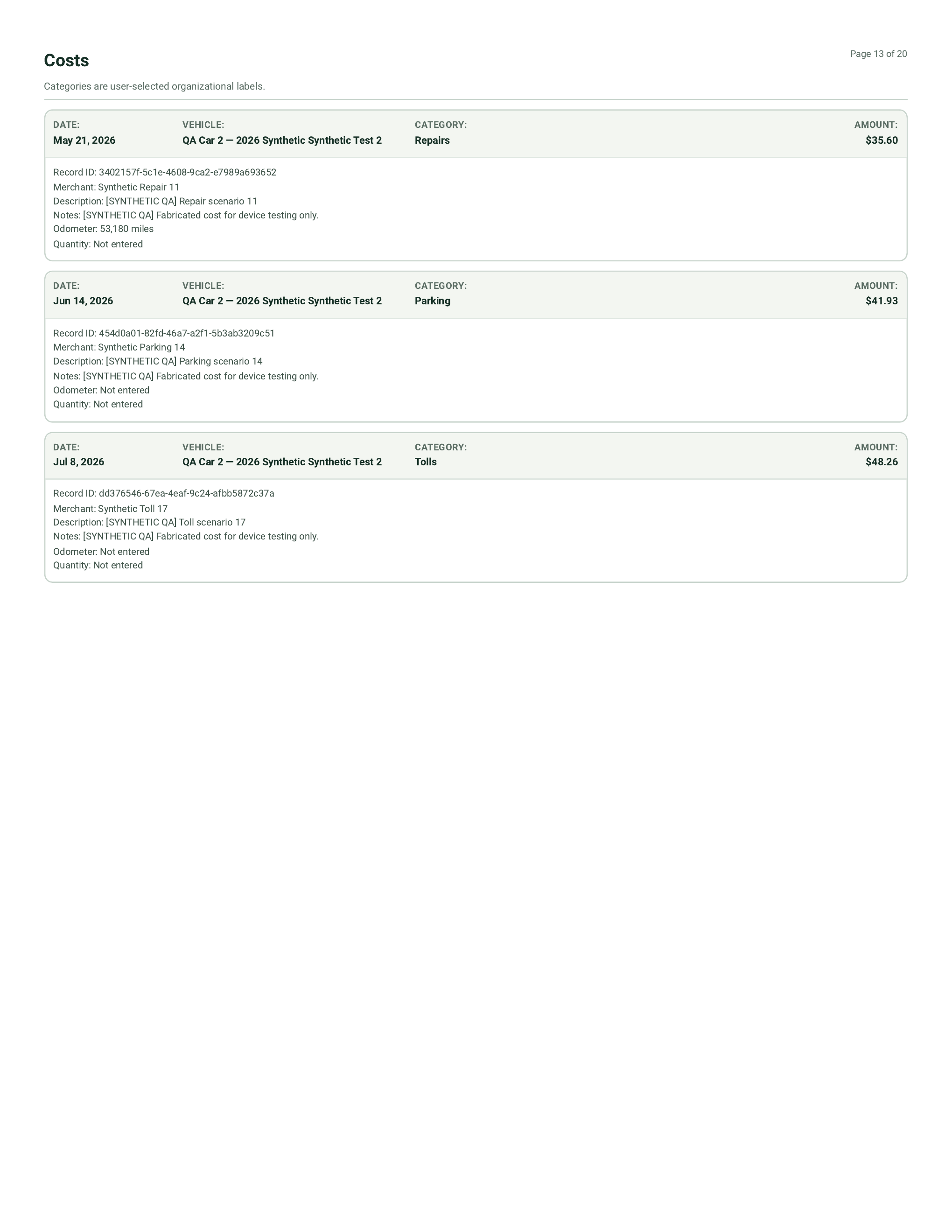
Review the individual amounts.
Expense records have their own pages within each vehicle section, with category,
amount, merchant, and the details entered in the app. All preview pages come from the
same export.
Detail from the actual sample PDF · Select to open the complete page
ONE TAP TO BEGIN
Start your drive. Review it in your own time.
Start a foreground, background, or Smart drive recording yourself. A Smart session can
keep running through sustained stops and queue distance summaries for you to review and
categorize.
Your saved record keeps distance and timing rather than a route history. One replaceable
working position is used while recording is active. Background recording depends on your
phone’s permissions and operating system, which can pause or stop it. Manual mileage
entry is always available.
Maps are optional and enabled separately for each app session. Enabling a map allows
provider tile requests; Look up sends a destination draft, and tapping a pin sends that
point to the device geocoder. Showing your location has its own permission control. An
external directions action starts or resumes your user-requested Smart drive before
sending the destination to that provider.
PRIVACY IS PART OF THE DESIGN
Your records. Your decisions.
Core recordkeeping is designed to work on your device, without requiring an account or
a connection.
01
Local comes first
The current app stores its ledger in an encrypted local database. Manual entry,
editing, review, and exports do not require a network connection.
02
Optional means deliberate
Maps and location recording have their own controls and permissions. You can keep
manual records without enabling them.
03
Sharing is a separate action
Exports go to a destination you choose. That destination controls its copy.
Optional encrypted cloud backup is being tested separately in development.
04
Your categories, your context
Choose the labels that help you organize each drive. Add the purpose and context
yourself, with recordkeeping support that leaves those decisions in your hands.
BUILDING WHAT COMES NEXT
A roadmap for everyday driving.
Follow the current work and the ideas we’re exploring. Status labels distinguish what’s
built from what’s planned; scope and timing will develop as testing progresses.
Implemented in development01 / THE FOUNDATION
Mileage, vehicle costs, review, and exports
The core recordkeeping tools are in the current build. We’re refining the experience
through device testing, accessibility work, and release preparation.
Development testing only02 / LESS TO REMEMBER
Automatic drive start
Aiming to make the start of a drive easier to remember. An opt-in Android QA trial
now connects vehicle-motion events to the recorder. Field testing, battery behavior,
device recovery, and release review continue. The public production configuration
keeps recording user-started.
Planning only03 / SYSTEM VOICE CONTROLS
“Hey Siri” / “Hey Google”
We’re exploring supported system voice and shortcut integrations so you can ask your
phone to perform OdoPad actions. Platform support and the actions available will be
defined as this work develops.
Planning only04 / AN ODOPAD VOICE ASSISTANT
Your voice, a simpler way to use OdoPad
A planned OdoPad assistant for carrying out app tasks by voice. We’ll decide which
tasks it supports as the design takes shape, alongside the permission, privacy, and
device requirements. Hands-free refers to app interaction; keep your attention on
driving.
Development testing only05 / OPTIONAL RECOVERY
Encrypted cloud backup
Exploring an optional way to upload an encrypted backup, review versions, restore,
and delete them. The current work runs in a development environment; your everyday
records remain local-first.
Based on the September 9, 2026 cold-recovery development handoff · Reviewed September 10,
2026
A LOOK AT THE PLANS AHEAD
Start free. Room to grow.
Proposed launch pricing in USD. Prices and plan details are still being finalized and
may change before release.
Proposed plan
Free
$0 / free plan
A starting point for everyday mileage and vehicle recordkeeping.
Pricing preview only · Subject to change · No payment or subscription is collected on this
website.
BEFORE YOU JOIN
A few fair questions.
Can I download OdoPad now?
OdoPad is in development for iOS and Android. Join the waitlist to follow progress and
hear about launch plans as device testing and release preparation move forward.
Will it be free?
We’re planning a Free version at $0 and Premium at $6.99/month or $59.99/year (USD).
This is proposed pricing, subject to change; purchases are not open. The current Free
configuration includes manual recordkeeping, two vehicle slots for new work, and ten
positive-distance recording summaries per rolling 14 days across recording modes.
Development Premium tools support up to five active vehicles and additional analysis,
maintenance, history, and backup creation. These are development settings and may
change before release.
How does drive recording work?
Tap to start a foreground, background, or Smart recording. A Smart session can
continue through sustained stops and queue distance summaries for your review.
Background recording depends on the operating system, which can interrupt it.
Automatic start is on the development roadmap, and manual entry remains available.
Can I use it without maps or an account?
The core app is designed for local recordkeeping. Manual mileage and expense entry,
editing, review, and exports do not require maps, location permission, an account, or
a network connection. Optional map services and future cloud features have separate
data flows.
Does it tell me what I can claim?
No. OdoPad organizes device-recorded and user-provided information. It does not
determine deductibility, eligibility, reimbursement entitlement, or tax treatment. You
choose how each record is classified and used; a qualified professional can help with
questions outside recordkeeping.
How do the free 30 days of Premium work?
Everyone who joins the waitlist before the app launches gets a code by email when the
app goes live. Redeem it within 60 days of that launch email. Your 30 free days of
Premium begin when you activate the offer. The app is still in development; joining
today saves your place for the offer, without starting a subscription.
What happens when I join the waitlist?
Your signup is saved immediately, including your email, optional phone platform,
consent and the Premium launch offer. We’ll email your code when the app goes live,
along with occasional development and launch updates. No confirmation email is sent
today. You can unsubscribe using your email address in
Manage my signup.
FOLLOW ALONG FROM THE BEGINNING
Interested in where this is going?
Join the development waitlist for occasional OdoPad progress and launch updates. Get a
closer look at new features as the app takes shape.
A THANK-YOU FOR JOINING EARLY
30 days of Premium. On us.
Join before the app launches and we’ll email your free Premium code when it goes live.
Redeem within 60 days of the launch email. Your
30 free days start when you activate.
The app is in development. No payment details are collected here.
Checking waitlist availability…
Help us improve OdoPad?
Allow Google Analytics to measure visits, successful signups and clicks. We never send your
signup email or form contents to analytics. Your choice does not affect the waitlist.
How analytics works